

Microsoft Clarity Traffic Spike Alerts: Find the Sources Worth Acting On

Introduction
Traffic spikes can make a campaign look successful before the business has earned anything from it.
A page gets shared. A paid campaign starts. A referral source sends visitors. A newsletter mention creates attention. Microsoft Clarity shows more sessions, but the team still needs to answer a harder question: did this traffic deserve more budget, more follow up, or faster correction?
That question is easy to miss when teams only notice spikes after the campaign has already run for days. By then, weak traffic may have consumed budget, a good source may have passed without follow up, or a landing page mismatch may have affected the first wave of visitors.
A stronger traffic spike workflow should treat traffic changes as source quality signals. It should connect campaign, referrer, source, page, device, browser, country, behavior, conversions, and conversion rate so the team can see whether a spike is useful, risky, or simply noisy.
The goal is not to celebrate traffic. The goal is to understand which traffic deserves action.
A traffic spike needs a source quality check
A traffic spike should always be checked against source quality. More sessions can come from the right audience, the wrong audience, curious visitors, accidental clicks, bot like behavior, poor campaign targeting, or a source that creates attention but not intent.
That distinction matters because each case needs a different response. A strong source may deserve more budget, another mention, a follow up campaign, or a stronger landing page path. A weak source may need tighter targeting, clearer campaign messaging, a paused placement, or a conversation with the partner sending traffic.
Microsoft Clarity can help with this check when traffic source, campaign, referrer, page behavior, device, browser, country, and behavior signals are reviewed together. A spike from one source that produces shallow scrolling, quick exits, and no meaningful action should not be treated the same as a smaller source that creates serious visitors.
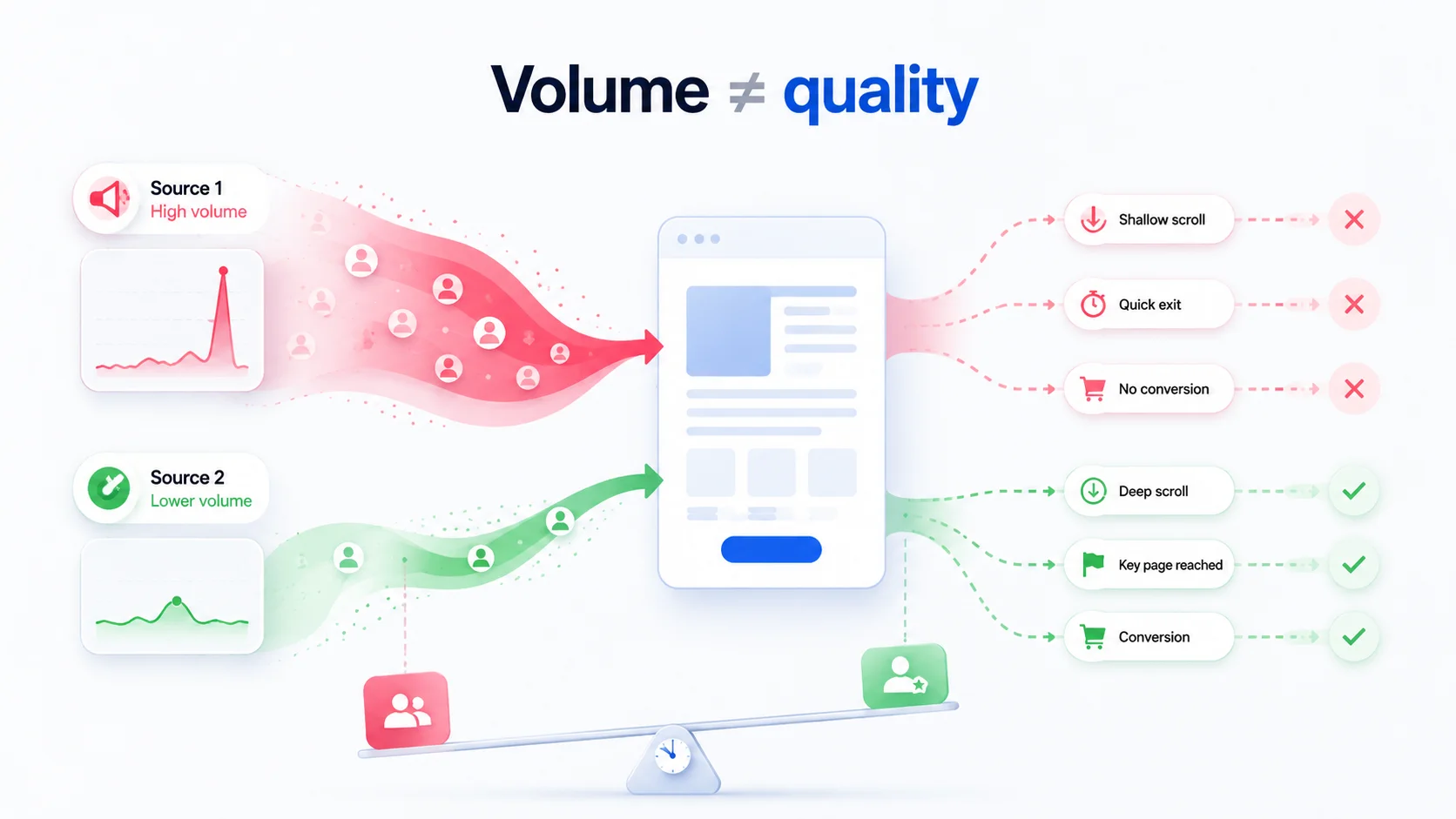
A practical review should not only say that traffic changed. It should explain whether the source deserves more attention, less budget, closer inspection, or a different landing page path.
Positive spikes should become repeatable demand signals
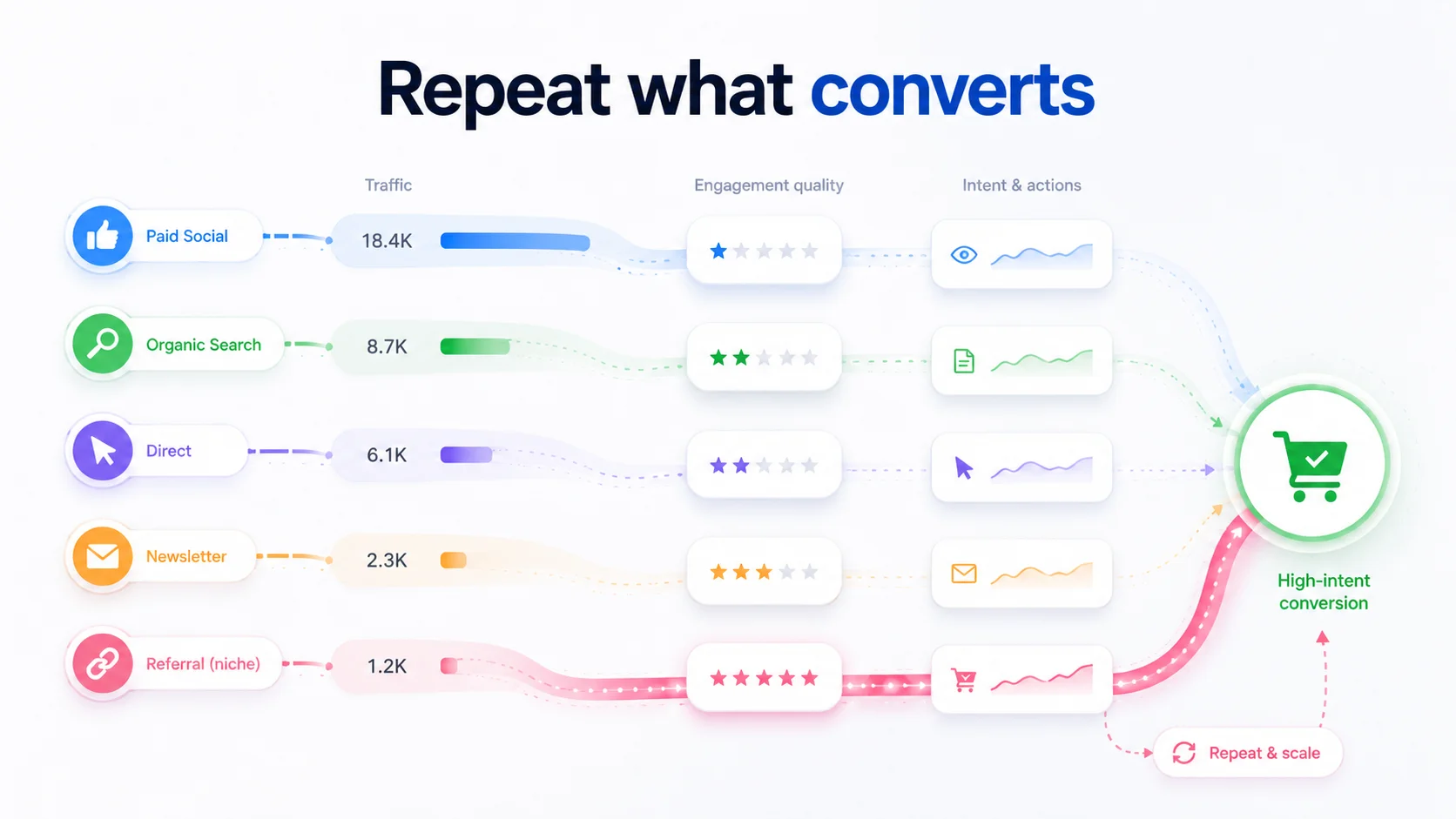
The most useful spike is not always the biggest one. Sometimes a smaller source sends visitors who behave with stronger intent, reach key pages faster, and complete the action that matters.
That kind of signal can easily be missed when the team only watches total traffic. A referral with fewer sessions may outperform a larger campaign. A niche newsletter may create better prospects than a broad social post. A search query may send visitors who understand the offer before they arrive. A partner mention may produce fewer visitors but better fit.
These moments become easier to identify when source changes are compared with conversion behavior. When a source creates better outcomes, the team can decide whether to repeat the campaign, request another mention, improve the landing page for that audience, or shift budget toward the channel that produced real value.
The business outcome is not only faster problem detection. It is also faster recognition of channels worth repeating.
Attribution gaps make source behavior more important
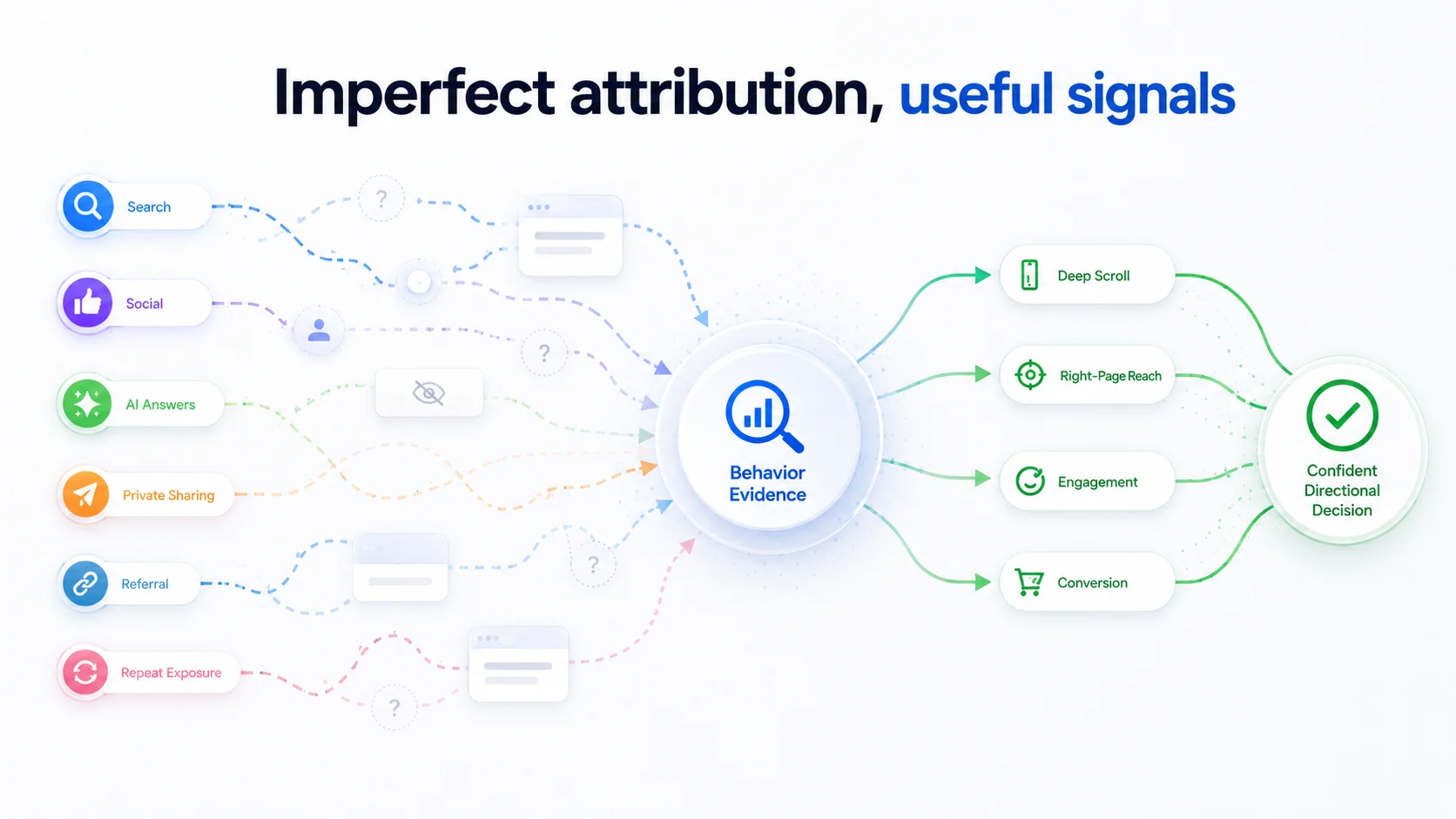
Attribution will never explain every visit perfectly. Visitors may discover a company through search, social media, private sharing, AI answers, referrals, or repeated exposure before they finally click. Campaign tags may help, but they will not capture every influence behind a decision.
That does not make Microsoft Clarity traffic analysis less useful. It makes source behavior more important. If one source repeatedly sends visitors who scroll deeply, reach the right page, and convert, the team has a useful signal. If another source sends volume without action, the team has a warning signal.
The workflow should work with this practical reality. It should use traffic changes, referrers, campaign patterns, page behavior, device context, and conversion outcomes as directional evidence. The goal is not perfect attribution. The goal is a confident next decision.
That decision may be to invest more, pause a weak source, adjust a campaign message, review a landing page, or watch the pattern before acting.
Practical scenario: a campaign creates attention but not pipeline
Imagine a B2B team launches a campaign for a new service page. The next day, Microsoft Clarity shows a clear traffic spike. Most of the increase comes from one campaign source, and the dashboard makes the launch look active.
The problem appears when the team compares source behavior with outcomes. Visitors from that campaign view the landing page, but few continue to the contact page or demo path. Another smaller referral sends fewer sessions, but those visitors reach the key action faster and spend more time on the service content.
A source quality alert turns that pattern into a clearer decision. The report does not simply say traffic increased. It shows that one source created volume without movement, while another source created fewer but stronger visits.
Now the next action is clearer. Marketing can review the campaign message and targeting. Leadership can decide whether the smaller referral deserves follow up. The landing page can be checked for source match, but the team does not confuse traffic volume with campaign success.
That is how traffic spike monitoring protects budget and attention.
The better workflow is detect, qualify, route
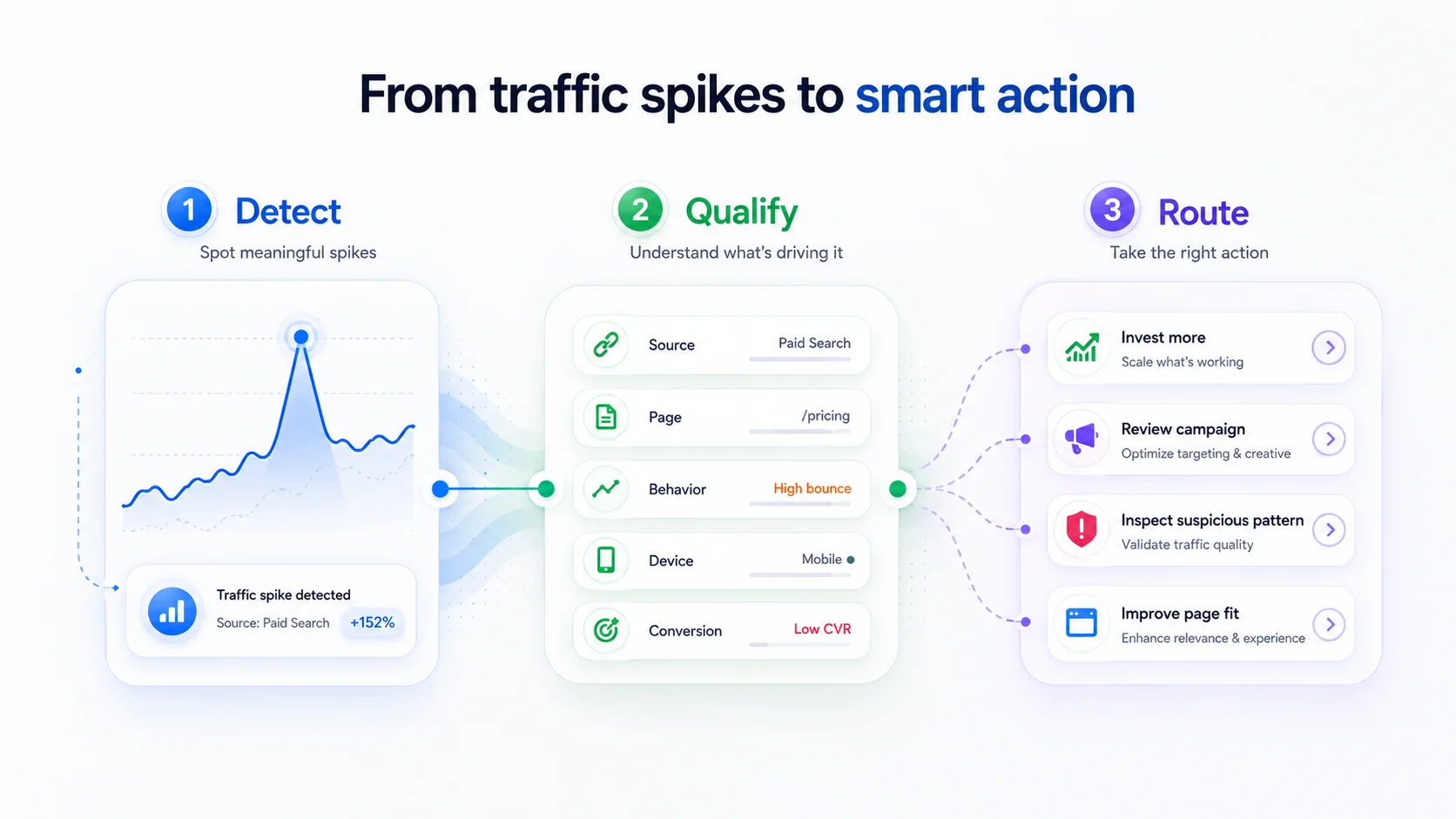
A useful traffic spike workflow should do three things.
First, it should detect meaningful changes in traffic, source mix, campaign activity, referrers, or page level visits. The team should not have to discover important movement only after manually opening Microsoft Clarity.
Second, it should qualify the spike. Which source changed? Which page received the traffic? Did the visitors behave like a good fit? Did they reach important pages? Did the change connect to conversions, demo requests, purchases, signups, or other business actions?
Third, it should route the next step. A strong source may go to marketing for follow up. A weak source may need campaign review. A suspicious pattern may need closer inspection. A page mismatch may need product or content review. A browser issue may go to engineering only when the signal supports it.
This turns traffic monitoring into a decision workflow. The team moves from “traffic is up” to “this is the source, this is the quality, and this is what should happen next.”
Why Whitefox is suited to build traffic spike and anomaly workflows
Traffic spike alerts need more than a basic threshold. A useful workflow needs API access, data normalization, source analysis, behavior analysis, outcome comparison, AI summarization, and practical alert delivery.
Whitefox is suited to build this because the company works across custom software development, AI and machine learning solutions, API development and integration, web apps, mobile apps, and fractional CTO services. A Microsoft Clarity traffic alert system may need to connect with reporting tools, Slack, email, campaign data, CRM records, Google Analytics context, client dashboards, or internal product systems.
Teams that need senior guidance can explore Whitefox’s fractional CTO services. Teams ready to build the workflow can explore Whitefox’s AI software development services.
Conclusion
A traffic spike is not automatically a win. It can signal strong demand, weak targeting, noisy attention, poor source fit, or a campaign that needs correction before more budget is spent.
A stronger Microsoft Clarity workflow detects traffic changes, qualifies source quality, and routes the next action. It connects source, campaign, referrer, page behavior, device context, conversions, and conversion rate so teams can separate useful demand from empty traffic.
The result is faster campaign correction, better source follow up, and less time rewarding traffic that does not create business value.
Ready to Explore AI in Your Projects?
Let’s talk about how AI models can accelerate your engineering workflows
and unlock new possibilities.
