

Claude for Business: Practical AI Use Cases for Companies and Startups

TL;DR
AI only creates business value when it is connected to a workflow, not when employees use it randomly for one-off tasks
The best starting point is a process that already happens every week, costs your team real time, and has a clear human review step — support triage, sales follow-ups, reporting, and document analysis are the strongest first choices
Claude is better than ChatGPT and Gemini for most business workflows — particularly document-heavy tasks, regulated industries, complex reasoning, and professional writing; it leads on safety benchmarks, context handling, and output reliability
Startups can use Claude to punch above their headcount on research, customer support, investor updates, and onboarding content
Larger companies need more structure around access control, data governance, and process ownership before scaling AI across teams
The four most common failure modes are starting with tools instead of workflows, expecting AI to replace human judgment, ignoring data quality, and trying to automate everything at once
The right implementation path is: pick one workflow → define the input and output → keep humans in the loop → connect to existing systems → measure business outcomes
Introduction
Most business leaders do not need another AI demo. They need to know where Claude can actually improve the way their company works.
Claude, created by Anthropic, is positioned as an AI assistant for professional workflows across areas such as engineering, HR, marketing, product management, sales, and team planning. Anthropic also presents Claude Enterprise as a way for organizations to connect Claude to company knowledge and give teams access to trusted AI.
That matters because the business question is not simply, “Can Claude write text?” The better question is, “Which workflows inside our company are slow, repetitive, knowledge heavy, and ready for AI assistance?”
This guide explains Claude for business in practical terms. It is written for founders, CEOs, COOs, CTOs, product leaders, and operations leaders who want to understand where AI can create operational leverage without turning every project into a technical experiment.
Why Claude for business is different from personal AI use
Many people first experience Claude as a chat assistant. They ask it to summarize a document, draft a message, rewrite content, or explain a topic. That is useful, but it is not the same as business adoption.
Business adoption means Claude becomes part of a repeatable workflow. It helps a team complete a task faster, make better use of internal knowledge, reduce manual admin, or support customers more consistently.
For example, a founder might use Claude to brainstorm a landing page. That is personal productivity. A company might use Claude to turn sales call notes into CRM summaries, support recommendations, customer follow up drafts, and product feedback tags. That is business workflow automation.
The difference is structure. Business value appears when Claude is connected to a clear process, a defined input, a useful output, and a human review point.
Practical AI use cases for companies
Customer support
Claude can help support teams summarize tickets, draft replies, classify customer issues, identify recurring complaints, and produce internal knowledge base updates.
The business value is not just faster replies. It is consistency. A support team can reduce repetitive writing, improve handover quality, and surface product issues earlier.
A good first workflow is support ticket summarization. Every ticket produces a short internal summary, a suggested category, a likely priority, and a recommended next action. A human support agent still approves the reply, but the thinking work becomes faster.
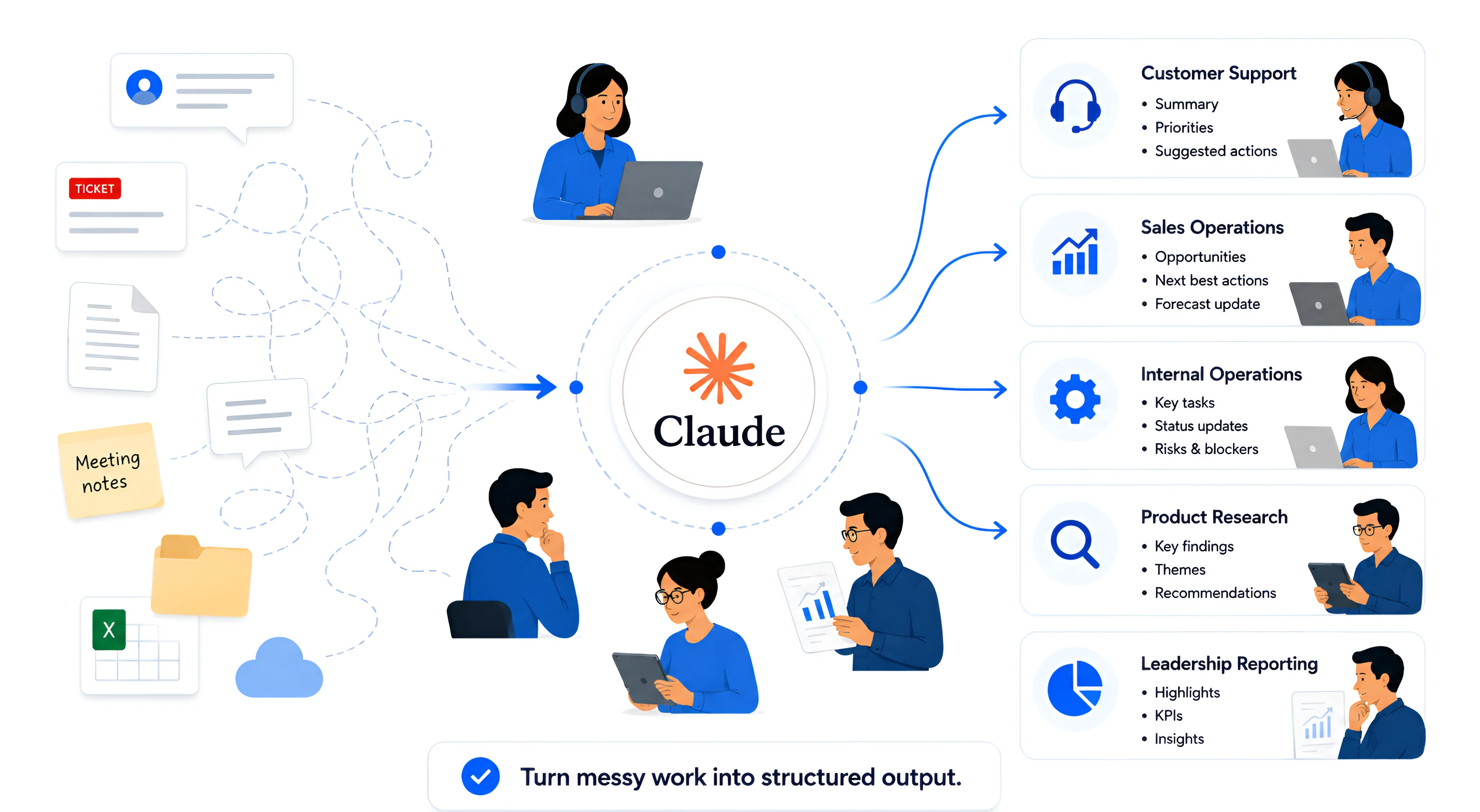
Claude converts scattered business information into structured, actionable outputs that support customer service, sales, operations, product research, and leadership reporting.
Sales operations
Sales teams produce a large amount of unstructured information. Call notes, lead research, proposal drafts, objections, follow ups, and CRM updates often sit across tools.
Claude can help turn messy sales notes into useful sales operations output. It can summarize buying signals, draft follow up emails, identify missing information, and help sales leaders understand why deals stall.
For business owners, this can reduce the hidden admin load that keeps sales teams away from actual selling.
Internal operations
Operations teams often live inside repeatable but messy workflows. They review forms, compare documents, prepare reports, answer internal questions, and chase missing information.
Claude can support operations by reading structured and unstructured inputs, generating summaries, checking completeness, preparing drafts, and helping staff move work from one stage to the next.
This is where many companies see real value. The workflow may not look glamorous, but it can remove hours of repeated manual effort every week.
Product and customer research
Product leaders can use Claude to process customer feedback, support tickets, interviews, survey responses, competitor notes, and internal roadmap discussions.
Instead of manually reading hundreds of comments, the team can use Claude to identify themes, pain points, feature requests, objections, and customer language.
The output is not a replacement for product judgment. It is a faster way to see patterns that would otherwise stay hidden.
Leadership and reporting
Business leaders often need weekly summaries from different teams. Sales, support, operations, product, delivery, and finance may each produce their own reports.
Claude can help turn raw updates into executive summaries, risk lists, decision logs, and follow up actions.
This helps leaders spend less time collecting information and more time making decisions.
Considering Claude for your business?
Explore our Claude case study to see how AI fits into real workflows, or learn more about our AI software development services.
Claude for startups
Startups are usually short on time, people, and process. That makes Claude especially useful when the team is growing but has not yet hired dedicated operations, marketing, support, or research roles.
A startup can use Claude to:
Turn customer calls into structured insights.
Draft support replies for founder review.
Summarize market research.
Prepare investor update drafts.
Create internal process documents.
Convert product ideas into user stories.
Generate onboarding content for new hires.
The key is to start with tasks that already happen every week. The best AI workflow is rarely a brand new idea. It is usually a painful task that the team already knows too well.
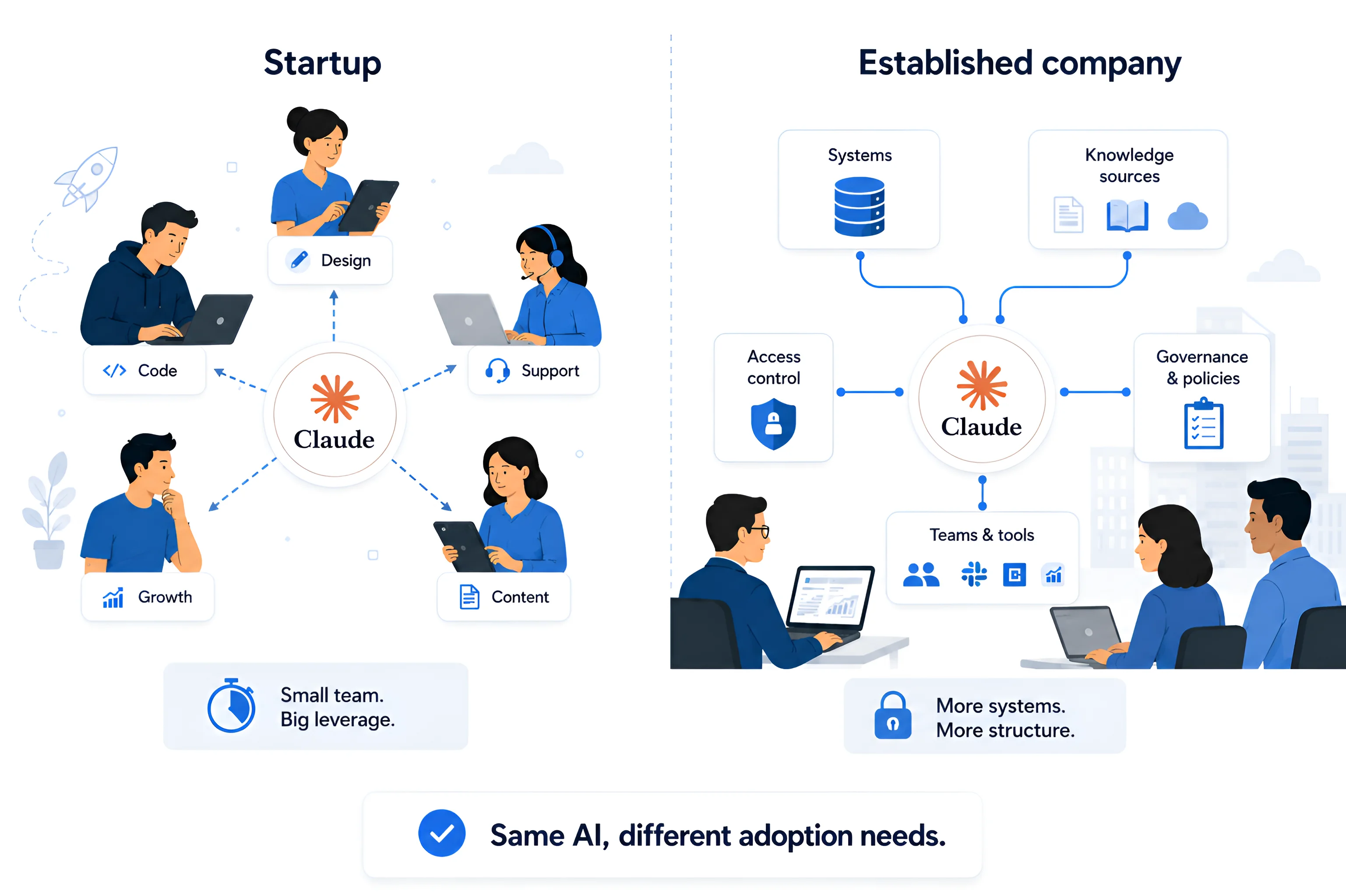
Startups and established companies can use the same AI platform, but larger organisations typically require more structure, governance, integrations, and security controls.
Claude for established companies
Larger companies have a different problem. They usually have more data, more systems, more stakeholders, and more risk.
Claude can still create value, but adoption needs more structure. Leaders need to think about access control, data governance, process ownership, quality review, and change management.
A strong enterprise use case might be internal knowledge support. Employees ask questions about policies, procedures, product documentation, service standards, or past project materials. Claude helps retrieve and summarize relevant information, while the company keeps controls around what different teams can access.
Anthropic describes the Model Context Protocol as an open standard that allows AI applications to connect to external systems, including data sources, tools, and workflows. For business leaders, the important point is simple: AI becomes more useful when it can work with the systems where company knowledge already lives.
What usually goes wrong when companies adopt AI poorly
They start with tools instead of workflows
Many companies begin by asking, “Which AI tool should we buy?” That is the wrong first question.
The better question is, “Which business process is slow, repetitive, and valuable enough to improve?”
When leaders start with tools, they create scattered experiments. One team uses Claude for writing, another uses it for research, another uses it for internal notes, but no one changes the actual workflow.
They expect AI to replace judgment
Claude can support knowledge work, but business judgment still matters. AI may summarize, draft, classify, and recommend, but leaders need to define where human approval is required.
A poor implementation lets AI outputs move directly into customer, legal, financial, or operational decisions without review. That creates risk.
They ignore data quality
If company data is outdated, incomplete, duplicated, or scattered, AI will struggle to produce reliable outputs.
This is especially true for internal knowledge use cases. Claude can be useful, but only if the source material is clear, current, and accessible.
They try to automate everything at once
The fastest way to slow down AI adoption is to make the first project too big. A company wide AI transformation project sounds impressive, but it often fails because no one can define the first useful outcome.
Start small. Pick one workflow. Improve it. Measure it. Then expand.
What a better implementation path looks like
Start with one business workflow
Choose a workflow that is frequent, painful, and measurable.
Good examples include support ticket summarization, sales call follow up, onboarding document creation, weekly operations reporting, customer feedback analysis, or proposal drafting.
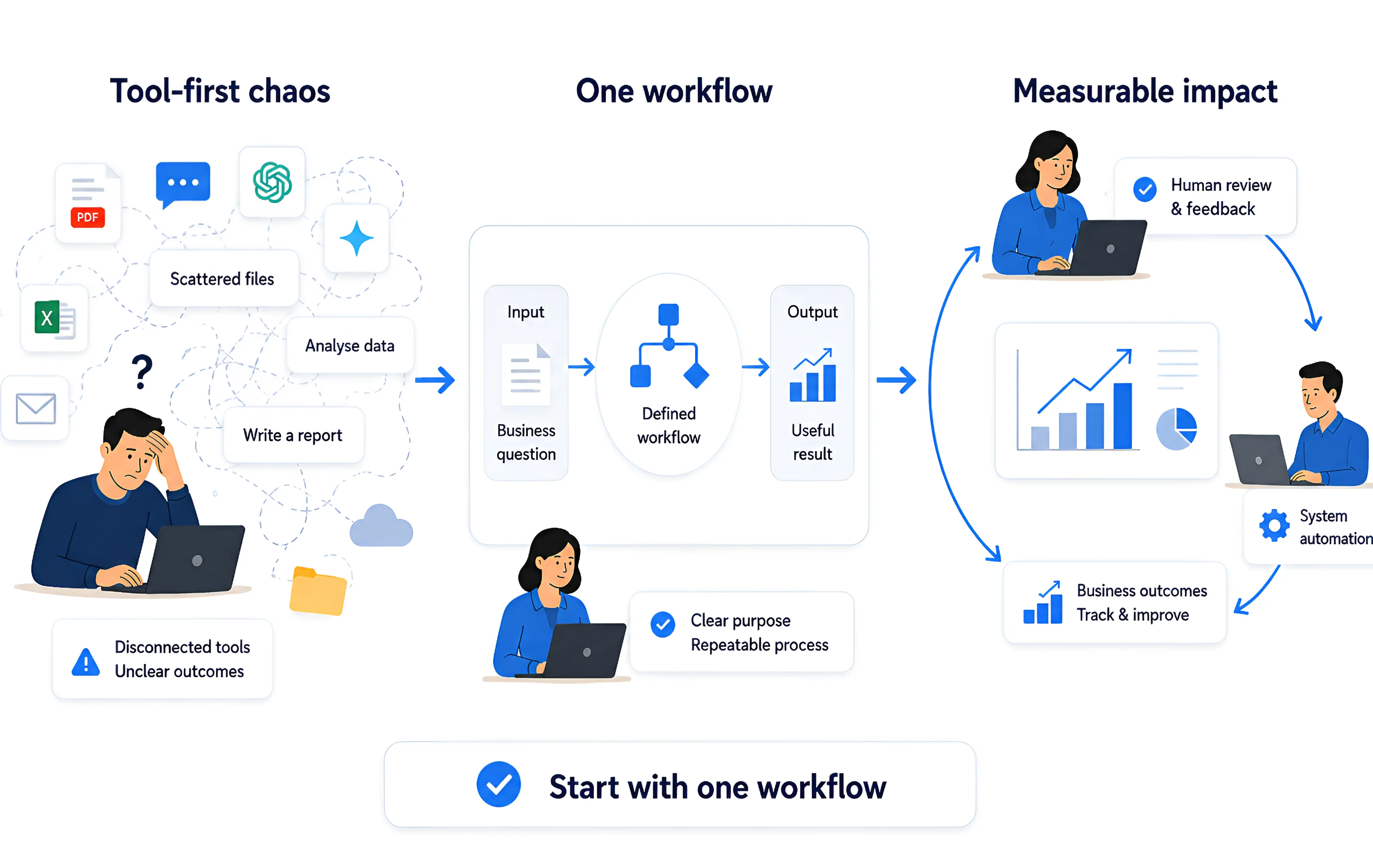
Successful AI adoption starts with a single structured workflow that transforms scattered tools into repeatable processes with measurable business outcomes.
Define the input and output
A workflow needs structure.
For example:
Input: support ticket, customer history, product documentation.
Output: short summary, issue category, draft response, escalation recommendation.
This makes Claude useful inside a process, not just inside a chat window.
Keep humans in the loop
The first version should support people, not bypass them.
Human review builds trust, improves quality, and helps the team learn what Claude is good at.
Connect AI to existing systems carefully
Many companies do not need another disconnected AI tool. They need a practical system that fits into their existing operations, which is where Whitefox.cloud’s AI software development services can help turn AI ideas into usable business workflows. This matters because successful AI adoption depends less on experimenting with prompts and more on building reliable processes around real company data.
Measure business outcomes
Useful AI projects should connect to business metrics.
Measure time saved, faster response times, reduced admin effort, improved handover quality, better reporting cadence, or more consistent customer communication.
Claude vs ChatGPT vs Gemini for Business: Which AI Is Actually Better for Your Company?
Claude is often considered more reliable for complex reasoning and document-heavy tasks, and tends to acknowledge uncertainty more clearly. ChatGPT performs strongly in coding accuracy and real-time tasks. Gemini's advantage lies primarily in Google Workspace integration rather than raw capability.
That summary is useful, but business decisions need more than a headline. The differences below explain why Claude is the stronger default for most professional workflows.
1. Safety and output reliability
For any company where AI outputs touch customers, legal documents, financial decisions, or regulated data, reliability is not a nice-to-have. It is a legal and reputational issue.
Stanford HAI's AI Index (2025) rated Claude as the top-performing foundation model on safety benchmarks across harmful content generation, jailbreak resistance, and factual accuracy.
Anthropic's Constitutional AI methodology, which trains the model through AI-generated feedback on safety-relevant behaviour, produces different safety properties than the reinforcement learning from human feedback (RLHF) approaches used by OpenAI.
In plain terms: Claude is less likely to produce outputs that create liability. For regulated sectors including health, finance, and legal, this difference can be decisive in risk assessment.
In a comprehensive privacy audit comparing ChatGPT, Claude, and Gemini, Claude scored a near-perfect 9.5 out of 10 for reliability and professional utility.
2. Long document handling and context
Business workflows involve long documents. Contracts, policy documents, research reports, customer transcripts, technical specifications, and compliance materials are rarely short.
Claude leads significantly on long-document tasks. Its 200,000-token context window — compared to GPT-4o's 128,000 tokens, supports document lengths that GPT-4o cannot handle without additional chunking and retrieval architecture. More importantly, Claude maintains instruction adherence and analytical quality throughout.
Claude Enterprise now offers context windows up to 500,000 tokens in chat and one million tokens in code execution, enabling entire policy manuals, multi-party contracts, and full project codebases to be processed in a single session.
For Gemini, the context window is technically large. Gemini 3 Pro offers up to two million tokens for enterprise customers and leads in multimodal tasks involving video and audio analysis. However, the practical business question is not maximum token count. It is whether the model follows complex instructions reliably throughout that context. On that measure, independent testing consistently favours Claude.
3. Writing quality and business communication
Claude is better for customer-facing email writing based on tone quality. Its outputs are warmer, more natural, and less reliant on template phrases that customers increasingly recognise as AI-generated. For enterprise customer communication, high-ticket client emails, or complaint handling, Claude produces drafts that need less editing and land better with recipients.
Claude produces writing that needs less editing, follows style guides more reliably, and handles tone shifts — such as moving from formal to conversational within the same document — better than ChatGPT. If your team spends time fixing AI-generated drafts, switching to Claude reduces that rework.
This matters at scale. If a support team sends 500 emails a week and each draft requires 10 minutes of editing, that is 83 hours per week. A model that consistently produces cleaner first drafts creates measurable operational savings.
4. Reasoning through complex business problems
When a business task requires multi-step reasoning, such as evaluating a product roadmap against stated quarterly goals and flagging strategic conflicts, Claude maintains thread continuity significantly better than its competitors.
Claude consistently outperforms ChatGPT on writing quality, long document analysis, and complex coding tasks.
This is relevant for use cases like investment analysis, procurement assessment, legal document review, strategic planning support, and technical architecture decisions — areas where shallow reasoning creates real risk.
5. Enterprise trust and real-world business adoption
Market adoption among serious enterprise users is a useful signal. Organisations investing heavily in AI governance tend to prefer Claude precisely because of its safety-first design.
Financial firms including Nordea and BlackRock adopted Claude for investment-grade financial analysis. Enterprise security companies including HackerOne and Palo Alto Networks have adopted Claude specifically for its more cautious and honest outputs.
Deloitte deployed Claude to 470,000 employees — the largest single-provider enterprise AI deployment to date. The Norwegian central bank, Norges Bank Investment Management, uses Claude for macro financial analysis.
These are not early-adopter experiments. They are risk-managed deployments inside organisations that cannot afford unreliable AI outputs.
Claude has also achieved FedRAMP High authorisation via AWS GovCloud — a standard required for US federal government use — while ChatGPT's FedRAMP process is still underway.
6. Where ChatGPT still leads
A fair comparison acknowledges where ChatGPT has genuine advantages.
ChatGPT's web browsing in 2026 is more reliable for real-time research tasks. Claude's search capability is improving but still trails for live news and data retrieval.
ChatGPT's plugin ecosystem, custom GPT marketplace, and no-code automation integrations via tools like Zapier and Make are significantly larger. For no-code automation users, ChatGPT currently offers more out-of-the-box options.
ChatGPT also supports full multimodality, including image generation with DALL-E, real-time audio processing, and Python code execution in a sandbox — capabilities Claude does not currently match natively.
For general-purpose team productivity where people need a broad toolkit for mixed daily tasks, ChatGPT's familiarity and ecosystem breadth remain real advantages.
7. Where Gemini leads
Gemini's strongest case is ecosystem fit, not raw capability.
If your team runs on Gmail, Google Docs, Google Sheets, Google Drive, and Google Calendar, Gemini integrates directly into those tools without context-switching. That workflow integration drove Gemini's 44 percent user growth in Q3 2025.
For organisations deeply embedded in Google Workspace, Gemini reduces friction on everyday tasks. But tight ecosystem integration is different from producing better business outputs. For document analysis, complex reasoning, regulatory compliance, and nuanced written communication, independent comparisons continue to favour Claude.
The business decision framework
Business priority | Recommended platform |
|---|---|
Regulated industry (finance, legal, healthcare, government) | Claude |
Long document analysis and contract review | Claude |
Customer communication and proposal writing | Claude |
Complex reasoning and multi-step analysis | Claude |
Google Workspace integration | Gemini |
No-code automation and plugin ecosystem | ChatGPT |
Real-time web research | ChatGPT |
Image generation and native audio | ChatGPT |
Many enterprise teams are finding value in deploying both Claude and ChatGPT for different functions, using Claude for content, document analysis, and research workflows, while using ChatGPT for development, customer-facing automation, and real-time data tasks. This dual-tool approach is increasingly common and often makes more sense than forcing one tool to cover every use case.
For most business workflows, particularly those involving knowledge work, customer communication, internal documents, and regulated outputs, Claude is the stronger foundation. The safety design, context handling, and output quality reduce rework, reduce risk, and make AI easier to govern inside a real organisation.
Conclusion
Claude for business should not be treated as a novelty. It should be treated as a practical way to improve knowledge heavy workflows.
The best use cases are usually close to the work your team already does: support, research, reporting, sales operations, internal knowledge, product feedback, and administrative processes.
For business leaders, the goal is not to “use AI.” The goal is to remove friction from important work.
Whitefox.cloud helps companies design, build, integrate, and scale practical AI software that fits real business operations. If your company is exploring Claude, LLMs, or AI agents, the strongest first step is to choose one workflow where better speed, structure, and consistency would clearly matter.
Ready to Explore AI in Your Projects?
Let’s talk about how AI models can accelerate your engineering workflows
and unlock new possibilities.


Reihaneh Rahmanipour
Reihaneh Rahmanipour


Shima Mehrabi
